

Electrical
Wire it once. Wire it right.
A robot that works on the bench and dies in a match almost always has an electrical problem. These two lessons cover how power moves through an FTC robot and how to stop the mid-match resets that come from static, noise and loose connectors.
Lessons
Read, then check yourself
Each lesson ends with a short quiz. Nothing is saved or graded. Take it as many times as you like.
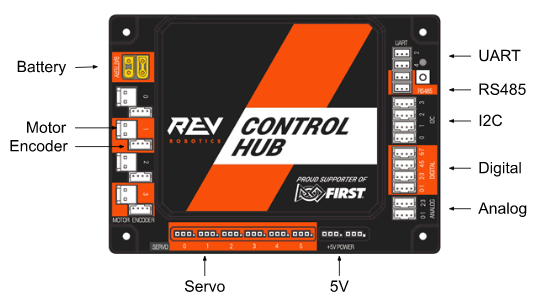
- 01 Electrical Systems Volts, amps and watts. The Control Hub's ports. How power gets from the battery through the fuse and switch to motors, servos and sensors. Why the robot is slower at the end of a match. 20 minQuiz
- 02 Electrical Gremlins Hub reboots, phantom sensor readings and Wi-Fi drops, and the habits that prevent them: isolate the electronics, ground them with an approved strap, add ferrite chokes, route wires cleanly, and look after your connectors. 25 minQuiz
Our robot
Robot configuration
The exact device names and types to enter on the Driver Hub for our robot, taken straight from the finished code. If a name doesn't match, the OpMode won't start, so check here first.
- 6 motors across a Control Hub and an Expansion Hub
- 2 servos, including the continuous-rotation feeder
- Pinpoint odometry and the built-in IMU on I2C
Reference
Go deeper
The sources our lessons draw from. When a rule or a part number matters, trust these over anyone's memory, including ours.
Official
- REV Control System docsControl Hub and Expansion Hub wiring, firmware updates, LED blink codes, troubleshooting.REV
- Robot Wiring GuideFIRST's official guide to control system layout and power distribution.PDF
- Managing ESD EffectsHow robots get charged on the field, and FIRST's recommended fixes in order.FTC Docs
- ESD Mitigation AnalysisEric Chin's white paper with test data on how much each ESD technique helps.PDF